
-
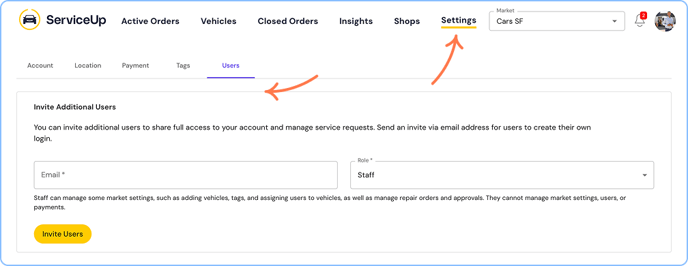
Click Settings in the top navigation.
-
Open the Users sub-tab.
-
Enter the user’s email address.
-
Choose Role Type: Account Admin, Manager, or Staff.
-
Click Invite User
Roles
| Role | What it's for |
|---|---|
| Account Admin | Full access to your fleet, including inviting people. |
| Manager | Manages vehicles and repair orders. |
| Staff | Creates and follows repair orders. Staff can't add vehicles; an Admin or Manager can. |
| Technician | Runs vehicle inspections. Technicians land on the Inspections page and can't open other fleet pages. |
If your company has several fleets set up as an organization, organization admins manage people across all of them. See Working across several fleets or stations.